To improve the design of your WordPress website, you must learn how to hide Elementor section. Elementor offers a number of adaptable options for controlling section visibility, whether you’re creating a page layout for various devices or wish to temporarily remove content without erasing it.
Using Elementor’s responsive visibility settings is one of the simplest ways to conceal a section. This enables you to display or conceal sections in mobile, tablet, and desktop views.
- Select the section you want to hide in Elementor
- In the left panel, click on the Advanced tab
- Go the Responsive dropdown
- Toggle visibility for Hide on Desktop, Hide on Tablet, or Hide on Mobile
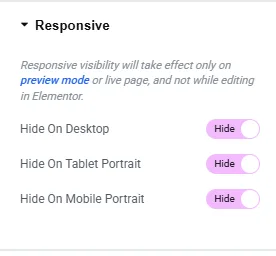
✅ When using Elementor’s responsive visibility options to adjust layouts for various devices, this approach works best.
Elementor section CSS tricks can be useful if you want more control. Sections can be hidden using CSS when certain states or conditions are met.
- Select your section and go to Advanced tab in Elementor
- Add Class or ID name in Advanced tab
- Open the Custom CSS dropdown (Pro version required)
- Open Customize Panel (Without Pro Version)
- Add the following code and save
selectorName {

  display: none;

}
⚡ By doing this, the section will be instantly hidden in the editor and on the live website. Be careful when using.
Additionally, you can fine-tune Elementor layout visibility using the built-in display settings.
| Method | Description |
|---|---|
| Responsive Toggle | Show/hide on desktop, tablet, or mobile. |
| CSS Display | Hide using display:none in custom CSS |
Related Article
Need an Elementor Expert
Let our Elemetor Expert quickly Develop WordPress site for you.
Use the section options or the built-in Navigator if you just want to temporarily hide a section while designing. When you need to test layouts or postpone content without completely deleting it from the editor, this is perfect.
- Right-click anywhere on the page and select “Navigator” to launch the Navigator
- Right-click on the section you wish to conceal
- To deactivate the section, choose Disable from the menu
- To conceal the section from the visual editor without erasing it, you can also click the eye icon
This technique is particularly helpful for previewing design options or saving unused sections for later revisions if you’re learning how to hide Elementor section in without erasing your content.
✅ Without changing the live design, this is ideal for hiding portions or staging content.
How to make a section clickable in Elementor?
Using an HTML widget or a third-party add-on, wrap the section inside a “Link Wrapper.” Then, add your preferred URL to make the entire section clickable.
How do I hide a web page?
Use your theme’s or security plugin’s settings to limit access, or set the page to Private, Password Protected, or Noindex.
How do I remove a section in Elementor?
To hide elementor section from the layout permanently, open the Elementor editor, right-click on it, and then select Delete.
You have strong control over the design of your WordPress website if you know how to hide Elementor sections. Each technique gives you the freedom to improve and simplify your design, from using responsive settings to CSS tricks and plugin-based conditional logic. Use the appropriate strategy based on your requirements to give your visitors a better experience.
To further improve the way your content looks on all devices, check out Elementor’s advanced settings guide.

Share on Social Media